
An EOTECH reticle is more than a glowing red dot. Depending on the holographic sight you choose, the window may show a 68 MOA ring with a 1 MOA center dot, a single dot without the ring, two or four vertically arranged dots, or the distinct Danger Close Reticle (DCR). Some models offer a green reticle instead of red.
The short answer: For most buyers who want the familiar EOTECH sight picture, the standard -0 ring-and-dot reticle is the straightforward starting point. The -1 removes the ring, the -2 adds a second dot, the -4 adds more references, and DCR changes the ring and lower markings. The best choice depends on the sight picture you prefer and the specific model’s features—not the number of dots alone.
This guide explains what each EOTECH reticle looks like, what its markings represent, how to interpret the sight picture, and how to identify the right variant before buying.
EOTECH Reticle Comparison at a Glance
| Reticle | What appears in the window | Main distinction | Example model |
|---|---|---|---|
| -0 | 68 MOA ring and one 1 MOA center dot | Classic EOTECH circle-and-dot design | EXPS2-0 |
| -1 | One 1 MOA dot; no outer ring | Simplest illuminated pattern | EXPS3-1 |
| -2 | 68 MOA ring and two vertically arranged dots | Adds a second reference below the main dot | EXPS3-2 |
| -4 | 68 MOA ring and four vertically arranged dots | Most detailed of these numbered patterns | EXPS3-4 |
| DCR | Modified ring with upper opening, center dot, and lower chevron | Distinctive Danger Close Reticle layout | EXPS3-DCR |
| .300 BLK | Specialized two-dot layout | A model-specific reticle, not simply the generic -2 | Check the exact .300 BLK model |
| Green -0 | Standard ring and center dot illuminated in green | Changes reticle color, not its basic layout | EXPS2-0 Green |
These are representative configurations, not a guarantee of current availability. Check the full manufacturer model designation and reticle illustration before ordering.
What Does the EOTECH Reticle Mean?
The signature EOTECH holographic reticle combines two noticeably different visual elements: a large outer circle and a very small center dot. The difference is intentional. The circle is easy to recognize in the window, while the central dot gives the pattern a much finer reference point.
MOA stands for minute of angle, an angular measurement used to describe reticle size. Roughly speaking, 1 MOA spans about one inch at 100 yards; EOTECH describes the standard dot as 1 MOA and the outer ring as 68 MOA. Those numbers describe how much of the view the features subtend, not the physical size of anything printed on the glass.
A holographic reticle is not interchangeable with the appearance of a conventional LED red dot, and not every EOTECH model uses the same markings. The exact reticle is determined by the specific sight configuration.
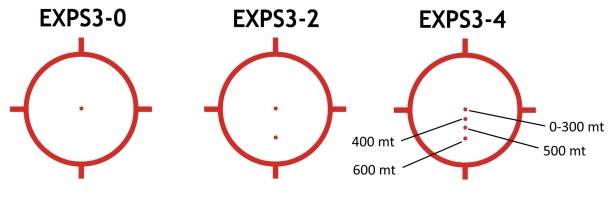
How to Use an EOTECH Reticle: Reading the Sight Picture
For someone asking how to use an EOTECH reticle, the first step is understanding which part of the illuminated pattern provides which type of reference:
- Center dot: The small, central reference in the standard -0 reticle. It remains visually distinct from the much larger outer ring.
- 68 MOA ring: The prominent circle surrounding the dot, making the overall reticle easy to locate in the window. EOTECH’s standard artwork also includes small directional marks around the ring.
- Additional lower dots: On -2 and -4 configurations, these are extra reference marks, not simply a brighter or larger version of the center dot.
- DCR chevron: A separate shape in the modified Danger Close Reticle; it should not be confused with an ordinary second dot.
A common source of confusion is treating every dot or part of the ring as if it indicated a fixed universal distance. It does not. EOTECH publishes model-specific reference information based on defined conditions. The actual meaning of additional references depends on the complete sight and firearm configuration, so consult the manufacturer’s documentation instead of assuming the same labels apply to every setup.
The other practical distinction is reticle design versus optic design. A model’s reticle suffix tells you about its pattern, while its XPS or EXPS family determines other features such as mount arrangement, control placement, and night-vision settings on applicable models.
The Standard EOTECH -0 Reticle: 68 MOA Ring and One Dot
The -0 EOTECH reticle is the familiar combination of a 68 MOA circle and one 1 MOA center dot. It is the design most people picture when they think of an EOTECH holographic weapon sight.
What makes this pattern appealing is that it balances a bold outer shape with a small central reference. Compared with a dot-only reticle, it fills more of the window with illuminated structure. Compared with multi-dot options, it is relatively simple.
If you want the traditional EOTECH appearance and do not have a particular need for extra reference marks, the -0 is an easy place to start. Examples include the EXPS2-0 and EXPS3-0. Their reticles are similar, but their overall feature sets differ.
Who should consider it? Buyers who prefer the classic ring-and-dot sight picture without additional dots below the center.
The EOTECH -1 Reticle: One Dot, No Circle
The -1 reticle removes the outer 68 MOA ring. What remains is a single 1 MOA dot. The result is a less visually busy window, but it is still an EOTECH holographic sight—not an entirely different optic category.
The naming catches some buyers off guard: -0 is the ring with one dot, while -1 is the dot without the ring. The number is a model suffix, not a count of how many illuminated marks appear.
If you already prefer minimalist dot-only reticles, compare the EXPS3-1 and XPS2-1. Don’t assume the simpler pattern is objectively more accurate or faster for every person; it primarily changes what you see.
Who should consider it? Buyers who want as little illuminated structure as possible in an EOTECH HWS.
EOTECH Two-Dot Reticle Explained: What Does the Second Dot Mean?
The EOTECH two-dot reticle, typically identified by the -2 suffix, retains the 68 MOA outer ring and adds a second small dot below the primary dot. EOTECH describes this as a pattern with additional aiming references and publishes reference information for particular loads and configurations.
The distinction from the -0 is easy to overlook when comparing product photographs: the housings may look nearly identical, but the reticles are not. The -2 provides more information in the window at the cost of slightly more visual complexity.
Is the EOTECH -2 just a -0 with an extra dot?
Visually, that is the simplest way to understand the difference. Functionally, however, the extra mark has a documented purpose within EOTECH’s model-specific reticle design. It should not be interpreted as a universal, preassigned distance for every cartridge, barrel length, or setup.
Is a two-dot EOTECH reticle better than a one-dot reticle?
Not automatically. The -2 offers additional reference information, while the -0 provides a simpler familiar ring-and-dot layout. If you don’t expect to use the extra reference, it may simply be another illuminated mark in your sight picture. If you specifically want the manufacturer-defined multi-dot layout, the -2 may be the more suitable configuration.
The EXPS2-2 and EXPS3-2 are examples. You can also compare the broader EXPS2 sight collection and EXPS3 sight collection.
Who should consider it? Buyers who specifically want additional reticle references without moving to the denser four-dot pattern.
EOTECH -4 Reticle: What Changes With Four Dots?
The -4 reticle combines the familiar outer ring with four vertically arranged dots. It offers more reference marks than the -0 or -2, but the view also becomes more crowded.
EOTECH notes that some of the smaller aiming dots in the four-dot design may be difficult to distinguish without magnification. That makes it particularly important to look at the reticle illustration and consider whether you actually want the additional markings. More dots are not a higher quality grade of holographic sight.
The EXPS3-4 is a representative model. A bundle with a magnifier is a separate purchase decision; verify precisely which sight and magnifier the package contains.
EOTECH DCR Reticle: How Is It Different?
DCR means Danger Close Reticle. Instead of an uninterrupted outer circle, it uses a modified 68 MOA ring with an opening at the top and a distinct lower chevron. EOTECH’s design also incorporates a primary center dot.
This is not the same as adding a second conventional dot to the standard -0 ring. The DCR has its own shape and manufacturer-defined references. For shopping purposes, the biggest immediate difference is visual: a modified ring and chevron rather than the conventional closed circle.
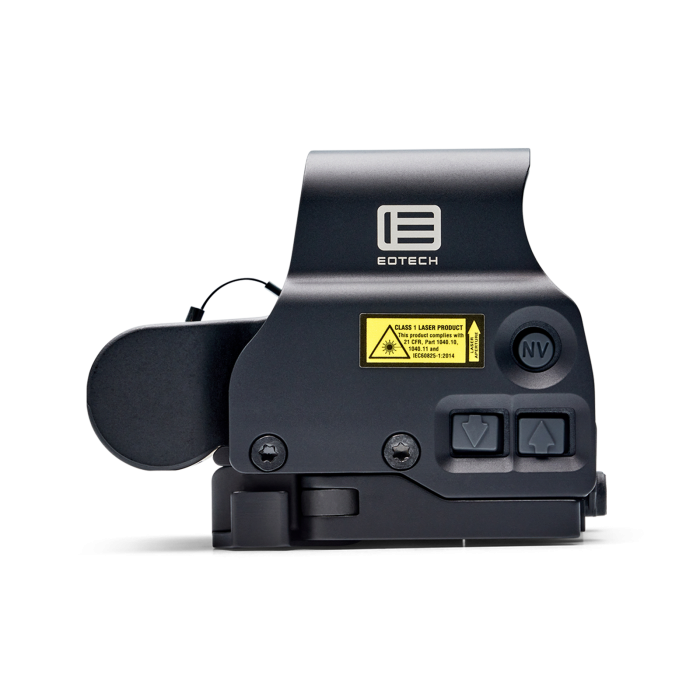
If that appearance is what you want, compare the EXPS3-DCR. EOTECH’s current public reticle index explicitly lists EXPS3 DCR. Other DCR-labeled listings should be verified against current manufacturer model information before they are presented as interchangeable options.
Is the .300 Blackout Reticle the Same as the Standard Two-Dot Reticle?
No. EOTECH has offered a .300 BLK-specific two-dot configuration, and its manufacturer description is tied to that specialized model. It may look similar to the ordinary -2 at a glance, but it is not safe to assume the published reference system is identical just because both have two dots.
For a purchase, compare the exact model name, the reticle illustration, and EOTECH’s product documentation. This is an example of why the number of dots alone is not enough to identify the sight you are buying.
Red vs Green EOTECH Reticles: Does the Color Change the Pattern?
The main difference is the illumination color, not the shape of the pattern. A standard green -0 configuration still has the recognizable large ring and small center dot; the design does not turn into a different reticle simply because it is green.
There can be other specification differences. For example, EOTECH lists 1,000 hours of continuous battery life for a standard red XPS2 and 600 hours for the green version under the manufacturer’s stated test conditions. Compare the precise model rather than assuming green and red differ only in appearance.
An optic’s housing color is separate from its reticle color. A tan EOTECH sight does not necessarily have a green reticle, and a green reticle does not by itself indicate night-vision compatibility. For an example, see the green EXPS2-0.
Does a Magnifier Change the EOTECH Reticle?
A compatible magnifier enlarges the viewed scene; it does not convert a -0 into a -2, add marks, or change the underlying reticle configuration. EOTECH explains that the angular size of its 1 MOA center dot remains 1 MOA with magnification, rather than becoming an oversized dot that covers more of the scene in angular terms.
The practical difference between reticles can become easier to observe with magnification, especially with the finer markings of the -4. If you are choosing the magnifier itself, see our EOTECH G33 vs G43 vs G45 comparison or browse EOTECH sight-and-magnifier combinations.
Why Does an EOTECH Reticle Look Grainy or Fuzzy?
A holographic sight picture may look different from a smooth, computer-drawn reticle diagram. The illuminated pattern can appear somewhat granular, and perceived sharpness can vary with brightness, viewing conditions, and individual eyesight.
A catalog illustration is therefore best used to compare pattern shapes, not as a promise that the illuminated window will look identical to a flat graphic. If a particular unit appears unusually distorted, duplicated, or otherwise abnormal, compare it with the manufacturer’s troubleshooting information and customer support guidance instead of assuming every irregularity is normal.
How to Read EOTECH Model Numbers Before Buying
In model names such as EXPS3-0, the EXPS portion identifies the sight family, the 3 identifies a feature series, and the final -0 describes the reticle configuration. For instance, an EXPS3-0 and EXPS3-2 belong to the same broad body family but have different reticle patterns.
An XPS2-0 and EXPS3-0 share the familiar -0 layout, yet other features differ. The reticle suffix does not tell you everything about controls, mounting height, or night-vision features. Review our EOTECH XPS vs EXPS guide and EXPS2 vs EXPS3 comparison for those separate buying decisions.
Also, suffixes and available combinations can change across product generations. Always verify the actual reticle diagram in the listing; don’t infer that every -0, -1, -2, or -4 variation is sold in every housing.
Which EOTECH Reticle Should You Choose?
Our recommendation is to choose by the view you actually want rather than by which reticle has the most markings:
- Choose -0 if you want the familiar 68 MOA ring and single center dot. It is the simplest recommendation for someone who wants the classic EOTECH pattern.
- Choose -1 if you prefer a minimalist 1 MOA dot without the large illuminated ring.
- Choose -2 if you specifically want two-dot reference information while retaining the standard outer ring.
- Choose -4 if you want the four-dot pattern and are comfortable with its more detailed appearance.
- Choose DCR if you prefer its modified ring and lower chevron instead of the usual circle-and-dot arrangement.
- Choose green if your preference is for green illumination after checking the exact model’s battery and other specifications.
When you have chosen the reticle, compare the sight body separately. A reticle choice should not accidentally make the decision about controls, mounting, or night-vision compatibility for you.
Frequently Asked Questions About EOTECH Reticles
What is the standard EOTECH reticle?
The standard -0 reticle is a 68 MOA outer ring with a 1 MOA center dot. It is the recognizable EOTECH holographic sight pattern.
What does the circle around an EOTECH reticle mean?
The circle is the large 68 MOA ring, which forms the prominent outer part of the traditional sight picture. The smaller 1 MOA center dot is a separate feature inside it.
What does the second dot mean on an EOTECH?
On a standard -2 reticle, the lower dot is an additional manufacturer-defined reference. It is not a universal fixed-distance marker that can be assumed to apply to every firearm or ammunition type.
What is the difference between EOTECH -0 and -2?
Both have the characteristic outer ring. The -0 has one center dot, while the -2 has two vertically arranged dots.
What is the difference between EOTECH -1 and -0?
The -1 is a dot-only reticle, without the outer circle. The -0 combines one center dot with the large 68 MOA ring.
Can you change an EOTECH reticle from one dot to two dots?
These are generally different model configurations, not a menu of patterns that can be switched electronically on an ordinary HWS. Buy the configuration with the reticle you actually want.
Is the EOTECH two-dot reticle the same as the .300 BLK reticle?
Not necessarily. EOTECH’s .300 BLK reticle is a specialized configuration with its own published reference information. Compare complete model names rather than assuming two similar-looking patterns are identical.
Does every green EOTECH have the same reticle?
No. Green tells you the color of illumination, not the complete pattern or housing features. Look at the full model name and manufacturer image.
Is the EOTECH reticle supposed to look pixelated?
A holographic reticle may appear more granular than a digital graphic. Appearance varies, but marked distortion or doubling should be assessed using EOTECH’s manufacturer guidance rather than dismissed as universally normal.
Manufacturer References
- EOTECH HWS reticle index
- EOTECH holographic sights and reticle overview
- EOTECH Help Center: HWS and MOA
- EOTECH EXPS3 reticle options
- EOTECH XPS2 specifications and reticle options
Model offerings and specifications can change. Consult the latest manufacturer information and the exact product listing before purchase.