
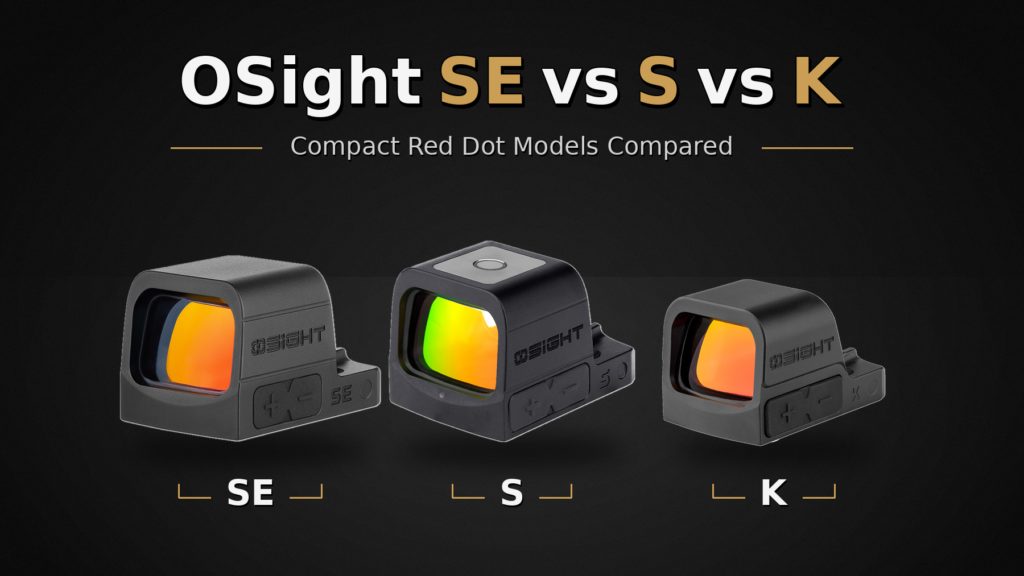
The Osight SE, S, and K share a compact RMSc footprint, but their similarities can hide the differences that matter when you own one. The SE combines an enclosed emitter with a replaceable battery. The S keeps the enclosed design and adds magnetic charging. The K uses an open emitter and a single 6 MOA red dot.
The SE and S have the same published window size and nearly identical body dimensions. Choosing between them is mainly about battery maintenance and reticle preference, not gaining a larger view. The K is not the lightest of the three, despite its open design.
This comparison covers the RMSc versions of the SE. The separately named SE MOS and SE DPP use different mounting patterns and bodies; they are not interchangeable with the compact SE discussed below.
In This Guide
- Quick Comparison: Osight SE vs S vs K
- Osight SE Overview
- Osight S Overview
- Osight K Overview
- Osight S vs SE: Replaceable Battery or Magnetic Charging?
- Osight SE vs Osight K: Enclosed or Open?
- Osight S vs Osight K: Two Different Ownership Routines
- Which Osight Compact Model Should You Choose?
- RMSc Footprint and the SE MOS / DPP Exceptions
- The Bottom Line
- Osight SE, S, and K FAQs
Quick Comparison: Osight SE vs S vs K
| Feature | Osight SE RMSc | Osight S | Osight K |
|---|---|---|---|
| Emitter | Enclosed | Enclosed | Open |
| Footprint | RMSc | RMSc | RMSc |
| Battery | Side-loading CR1620 | Built-in rechargeable; magnetic charging cover | Side-loading CR1620 |
| Reticles | 2 MOA dot / 32 MOA circle, or fixed 6 MOA dot; model dependent | 2 MOA dot / 32 MOA circle | Fixed 6 MOA red dot |
| Reticle colors | Separate red and green models | Red | Red |
| Window | 0.83 x 0.55 in | 0.83 x 0.55 in | 0.83 x 0.55 in |
| Body, L x W x H | 1.59 x 0.98 x 0.97 in | 1.59 x 0.98 x 0.97 in | 1.59 x 0.98 x 0.98 in |
| Optic weight | 0.97 oz | 0.97 oz; charging cover separate | 1.02 oz |
| Water-resistance rating | IPX7 | IPX7 optic | IPX6 |
Dimensions are the manufacturer’s rounded specifications. The S dimensions and weight describe the optic itself, not the charging cover placed over it.
Osight SE Overview
The SE is worth starting with if you want an enclosed compact optic without adding another rechargeable device to your routine. Its CR1620 battery loads from the side, so a battery change does not require removing the sight. The enclosed housing protects the internal emitter path from lint and debris, although the outside of the lenses still needs normal cleaning.
You have four useful RMSc choices. The multi-reticle models offer a 2 MOA dot, a 32 MOA circle, or both together. The fixed-dot versions use a larger 6 MOA aiming point. Red and green are separate products, not colors you can switch between on one sight.
- SE red 2 MOA dot / 32 MOA circle: a small dot with optional surrounding circle.
- SE green 2 MOA dot / 32 MOA circle: the same reticle choices in green.
- SE red 6 MOA dot: one larger dot without circle modes.
- SE green 6 MOA dot: the larger fixed dot in green.
The SE’s appeal is this combination of battery access, enclosure, and choice. It does not require you to accept a rechargeable system just to get an enclosed emitter. Compare the variants in our Osight SE collection before choosing a color and reticle.
Osight S Overview
The Osight S pairs an enclosed RMSc body with a built-in rechargeable battery. Its magnetic cover charges the optic and displays battery levels for both the sight and the cover. You keep the optic mounted while charging it, but you also need to keep the cover charged and available.
The S provides a red 2 MOA dot and 32 MOA circle, with dot-only, circle-only, and combined modes. It also offers an automatic brightness mode. That gives it a different everyday experience from choosing a brightness level and periodically replacing a coin cell.
At 0.97 oz with a 0.83 x 0.55-inch window, the S is essentially the same size class as the SE. Its charging cover is a separate accessory, not part of the optic’s listed weight. Choose the S because you prefer its charging and brightness features, not because you expect a significantly larger window or smaller body.
Osight K Overview
The Osight K takes a simpler approach: an open emitter, side-loading CR1620 battery, and fixed 6 MOA red dot. There is no circle reticle to cycle through and no charging cover to manage. Its window is the same published size as those of the SE and S.
A 6 MOA dot appears larger than a 2 MOA dot at the same brightness and viewing distance. Some people find the larger point easier to see; others prefer the smaller dot’s less-obstructed view. That is a preference to evaluate with your own eyes, not a guarantee that one model will work better for everyone.
The K’s open emitter leaves the light path behind the front lens exposed. The trade-off is a less enclosed design, not a meaningful weight saving: its published 1.02 oz weight is slightly higher than the SE and S. It makes sense when you specifically want a fixed red dot and a replaceable battery.
Osight S vs SE: Replaceable Battery or Magnetic Charging?
These two are the closest physical match. Both enclose the emitter, use RMSc mounting, and provide a 0.83 x 0.55-inch window. In the red multi-reticle versions, both also give you a 2 MOA dot and 32 MOA circle. Neither offers a larger viewing window as the main reason to upgrade.
The SE suits a coin-cell routine: keep a replacement CR1620 handy and change it through the side tray. The S suits a charging routine: attach its magnetic cover and check the battery display. The S also adds automatic brightness, while the SE offers more choices of fixed-dot size and reticle color.
If you already know you want green or a fixed 6 MOA dot, the SE variants provide those choices. If the red circle-dot combination suits you and you like a visible charge readout, the S offers something the SE does not.
Osight SE vs Osight K: Enclosed or Open?
The fairest comparison is the red 6 MOA SE against the K. Both use a CR1620, RMSc footprint, and fixed red 6 MOA dot. The SE then adds an enclosed emitter, with almost the same overall size. You do not need to move to a different reticle or rechargeable battery to choose that enclosure.
The multi-reticle SE models add another reason to choose the SE: a smaller dot and optional circle. The K keeps the decision narrower. Compare the actual prices of those specific versions rather than treating every SE variant as the same product.
Osight S vs Osight K: Two Different Ownership Routines
The S changes three things at once: it encloses the emitter, replaces the coin cell with magnetic charging, and offers circle-dot modes instead of a fixed 6 MOA dot. The K keeps a replaceable battery and one reticle. Their similar footprint and window dimensions do not make their controls or maintenance the same.
Choose between them based on the features you will actually use. If the charging cover is unappealing but you still want an enclosure, the SE is the more direct alternative to the S.
Which Osight Compact Model Should You Choose?
- Choose the SE for an enclosed emitter with a replaceable battery, especially if you want green or a choice between fixed-dot and circle-dot versions.
- Choose the S for an enclosed red circle-dot optic with magnetic charging, battery-level display, and automatic brightness.
- Choose the K for a fixed 6 MOA red dot, open emitter, and side-loading battery.
RMSc Footprint and the SE MOS / DPP Exceptions
RMSc describes the mounting pattern, not a promise that an optic bolts directly onto every compact pistol. The slide or plate must support the specific sight, and housing clearance and hardware still matter. Check the handgun and optic makers’ compatibility information before ordering.
The SE MOS is designed for compatible full-size GLOCK MOS slides and uses a CR1632. It is not the RMSc SE and should not be assumed to fit slimline MOS models. The SE DPP uses the DeltaPoint Pro footprint and a larger 0.91 x 0.71-inch window. Those suffixes identify real differences, not cosmetic editions.
The Bottom Line
For an enclosed compact optic with a familiar battery, start with the SE. The S is the alternative when magnetic charging is a feature you want. The K is for the buyer who prefers one large red dot and an open design. Once the footprint is right, battery preference and reticle choice make this a much easier comparison.
Osight SE, S, and K FAQs
Both are enclosed RMSc optics with the same published window size. The S uses a rechargeable battery and magnetic charging cover; the SE uses a side-loading CR1620. The SE also offers separate red, green, multi-reticle, and fixed 6 MOA versions.
Not meaningfully smaller, and not lighter by the published specifications. The K measures 1.59 x 0.98 x 0.98 inches and weighs 1.02 oz. The RMSc SE measures 1.59 x 0.98 x 0.97 inches and weighs 0.97 oz.
Yes. There is a fixed red 6 MOA RMSc SE as well as a green 6 MOA version. These are separate from the 2 MOA dot / 32 MOA circle models.
The RMSc versions compared here all have a published 0.83 x 0.55-inch window. The SE DPP is a different version with a larger window.
No. The SE MOS is a different body and mounting version for compatible full-size GLOCK MOS slides. Check the complete model name rather than ordering by the SE name alone.
Manufacturer references: SE specifications and variants, S specifications, and K specifications.