The EOTECH XPS and EXPS families are close enough in appearance to make shopping confusing. Both use a compact transverse battery arrangement, both offer familiar EOTECH reticles, and both include models with or without dedicated night-vision settings. The extra E is not a universal indication that one has better electronics.
The main XPS vs EXPS differences are mounting height, button placement, attachment style and weight. The XPS is the lower, lighter option with rear controls and a cross-bolt mount. The EXPS has a raised quick-detach base and side controls. Whether those additions are worth it depends on how you want the complete sight arrangement to feel.
Here is a closer look at both families, followed by the XPS2 vs EXPS2 and XPS3 vs EXPS3 comparisons. We are comparing the standard models, not treating the separate EXPS3 HD as interchangeable with every EXPS3.
In this guide
- EOTECH XPS: The Lower, Lighter Option
- EOTECH EXPS: Side Controls and a Raised QD Base
- XPS vs EXPS: Side-by-Side
- XPS2 vs EXPS2: What Are You Paying For?
- XPS3 vs EXPS3: Do Not Confuse NV with the Body Style
- Which Is Better with a Magnifier?
- Reticle and Color Come After the Body Decision
- Our Verdict
EOTECH XPS: The Lower, Lighter Option
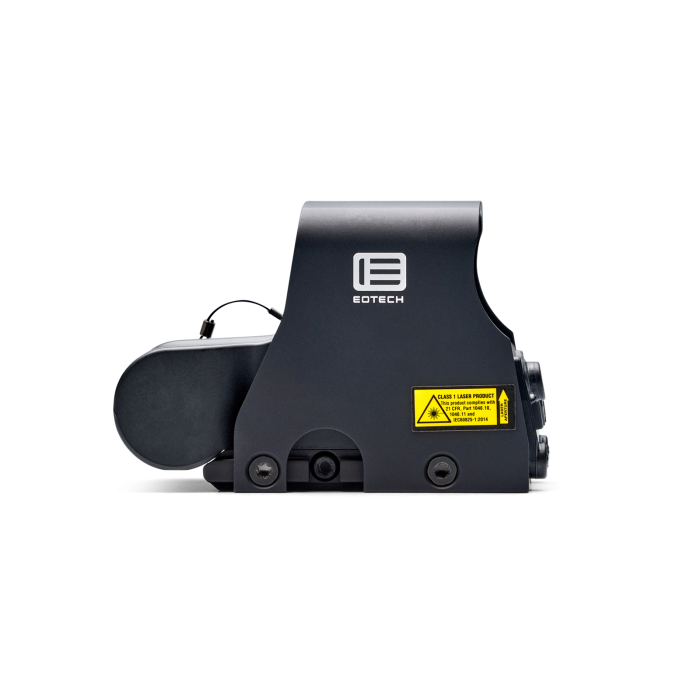
The XPS is attractive when you want the compact EOTECH format without a raised quick-detach base. Its rear buttons and cross-bolt attachment keep the design straightforward. With standard AR-height iron sights, its familiar mounting arrangement is described as absolute co-witness rather than the EXPS’s lower-third arrangement.
EOTECH lists the standard XPS2 and XPS3 at 9 ounces and 3.8 inches long. That gives the XPS a weight advantage over the EXPS, but not a shorter published length. Calling the EXPS longer simply because it looks taller in photographs would be misleading.
The XPS is the family we would examine first if you prefer the lower sight arrangement, do not need a quick-detach lever and value reduced weight. Those are positive reasons to choose it. It does not need to be framed as the sight you buy only when you cannot afford an EXPS.
XPS2: The Non-NV Starting Point
The XPS2 family leaves out dedicated night-vision settings. That can make it the sensible option when you want the normal EOTECH viewing experience and have no reason to pay for NV compatibility.
Reticle and finish choices still matter. A black XPS2-0, dot-only XPS2-1 and green-reticle XPS2 are not the same configuration. Choose the pattern you want rather than assuming every XPS2 listing differs only in price.
XPS3: Night-Vision Compatibility in the Same Basic Format
The XPS3 family adds dedicated NV settings while retaining the standard XPS size and weight. It is a direct answer to someone who wants the lower, lighter body but needs the XPS3’s electronic features.
It also has a deeper published submersion rating than the XPS2. That is a real specification difference, but it does not mean a non-NV XPS2 is unsuitable for ordinary outdoor ownership. Decide whether the added capability is relevant to you rather than buying on the assumption that every higher model number is automatically necessary.
EOTECH EXPS: Side Controls and a Raised QD Base
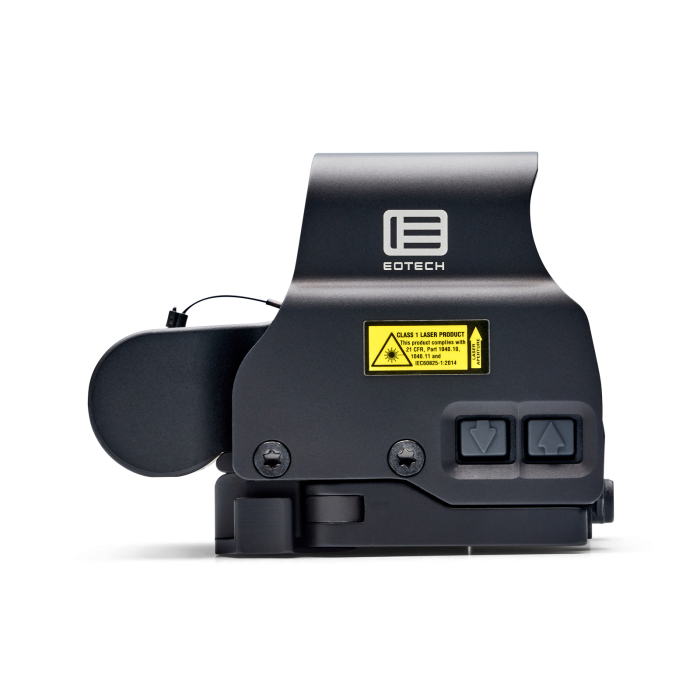
The EXPS earns its place through convenience and geometry. Its side controls remain accessible without reaching directly behind the sight, and its integrated quick-detach base changes how the optic attaches. The raised arrangement gives lower-third co-witness with standard AR-height irons.
Those are features you can appreciate independently of night vision. You do not need to choose an EXPS3 to get the basic EXPS mounting and control layout. A standard EXPS2 already provides it.
The tradeoff is a taller, wider and heavier package than the XPS. Some buyers prefer that geometry, while others find the XPS better suited to what they already own. We would not call either mounting height universally more comfortable. A preference that works well for one person or existing setup may not suit another.
EXPS2: The EXPS Features Without the NV Premium
The EXPS2 is the model family we would recommend when side controls and a QD base are important but dedicated night-vision settings are not. It retains the practical reasons people are drawn to the EXPS format.
The green-reticle option is a separate configuration to compare, not an automatic upgrade. It changes the illuminated color and rated runtime. If the familiar red pattern suits you, choosing green merely because it sounds newer is not necessary.
EXPS3: The Same Everyday Layout with NV Capability
The standard EXPS3 combines the side-control/QD layout with dedicated night-vision settings and a deeper water-resistance rating. Its broader reticle selection can be another reason to choose it.
We would buy it because one of those additions solves a real preference or requirement. Paying more simply to avoid owning a model with a 2 in the name is a less convincing reason. Our EXPS2 vs EXPS3 guide explores that specific decision in greater depth.
XPS vs EXPS: Side-by-Side
| Feature | Standard XPS | Standard EXPS |
|---|---|---|
| Controls | Rear | Side |
| Attachment | Cross-bolt | Quick-detach lever |
| AR-height iron relationship | Absolute co-witness | Lower-third co-witness |
| Length | 3.8 in | 3.8 in |
| Weight | 9.0 oz | 11.2 oz |
| Battery | One CR123 | One CR123 |
| Night-vision model | XPS3 | EXPS3 |
The figures above describe the standard body families. Special editions or newer derivatives should be checked against their own specifications. Co-witness descriptions also assume the relevant standard-height iron-sight arrangement; they are not a universal promise for every platform.
XPS2 vs EXPS2: What Are You Paying For?
This is the cleanest comparison if you do not need dedicated NV settings. Both belong to the non-NV category, so the meaningful choice is the body and mount. Match reticle and color first, then compare the price of the two listings.
We would pay extra for the EXPS2 when we specifically wanted its side buttons or quick-detach base. We would choose the XPS2 when lower weight and the lower mounting arrangement mattered more. Neither decision requires believing the other sight is deficient.
If you intend to add an aftermarket riser or another mounting accessory immediately, include that cost and weight in the comparison. A bare XPS and a fully modified XPS are not the same purchase. Think about the complete arrangement you actually want rather than the lowest initial sight price.
XPS3 vs EXPS3: Do Not Confuse NV with the Body Style
Both standard 3-series families offer dedicated night-vision settings. The EXPS3 is not the only choice simply because it is the one you hear mentioned most often. The XPS3 remains a relevant alternative for buyers who prefer the XPS format.
Compare the exact reticle as well as the housing. A price comparison between two differently configured sights can make a premium look larger or smaller than it really is. For the simplest comparison, start with the same color and ring-and-dot configuration in each family.
Which Is Better with a Magnifier?
The EXPS’s side controls are convenient when a magnifier is behind the sight, which is a good reason to favor it for that arrangement. It does not follow that the XPS cannot be used with a compatible magnifier.
The complete mounting geometry still needs to match. A magnifier and sight being made by the same company is not a substitute for confirming the height and mount configuration. If you are buying both pieces, a named HHS package can simplify shopping, provided it includes the reticle and magnifier you actually want.
See our G33, G43 and G45 comparison for the magnification decision, or browse EOTECH HHS packages for paired options.
Reticle and Color Come After the Body Decision
Once you know which body you prefer, choose the pattern. The familiar -0 ring-and-dot layout, dot-only versions, multi-dot patterns and DCR are different views, not simply different grades of the same sight.
Our EOTECH reticle guide illustrates those differences. Make this decision deliberately: a bargain on a pattern you do not like is less useful than a correctly chosen sight.
Our Verdict
Choose XPS for the lower, lighter format and straightforward attachment. Choose EXPS for side controls and the raised quick-detach base. Then choose 2 or 3 according to whether you need the added features of the night-vision-compatible family.
That separates four models into two manageable questions instead of treating them as a ladder from worst to best. Start with the XPS2 or EXPS2 for non-NV options, and compare XPS3 or EXPS3 when NV compatibility is part of your plans.
Frequently Asked Questions
The standard EXPS has side controls and a raised quick-detach base. The XPS has rear controls, a cross-bolt mount and a lower, lighter body.
The standard XPS and EXPS specification tables both list 3.8 inches of length. The XPS is lower, narrower and lighter, rather than shorter in that comparison.
No. EXPS2 does not have the dedicated NV settings of EXPS3. XPS3 also offers NV compatibility, so the body prefix alone does not answer that question.
Yes, with a compatible mounting arrangement. EXPS side controls can be more convenient with a magnifier behind the sight.
The standard XPS arrangement provides absolute co-witness with standard AR-height irons. The raised EXPS arrangement provides lower-third co-witness.
Sources
Manufacturer references: XPS2, XPS3, EXPS2, EXPS3 and EOTECH mounting guidance.
Leave a Reply